| IEInternals Blog |
 |
IE8 FAQ |
| Add-ons | Tweaks | Web Development | Add-on Development | Troubleshooting | Contact |
|
|||||||
| |||||||
FiddlerIf you're a developer, debug your Web Traffic using Fiddler.
Web Developer's Add-onsMicrosoft's IE Developer Toolbar offers assorted web developer features. (IE7 only; IE8 has a superior feature built in; just hit F12.) Nikhil's WebDevHelper bar is a great script debugger with a lightweight HTTP traffic viewer. It has many ASP.NET helper functions. Microsoft's IE Powertoys for WebDevs (includes the "View Partial Source" context menu) Search your siteIt's easy to offer the user the ability to search your site from anywhere, using the XML scripts produced by the Search Provider Builder. Simply download the XML file, place it on your server, and set a META tag or attach it to a link or button in your HTML. Run IE 6, 7, and 8 on the same PCMicrosoft is now offering a free copy of VirtualPC and a virtual hard disk containing IE6, allowing you to run IE6 and IE7 on the same physical PC. This is useful for doing side-by-side rendering tests with only one machine.
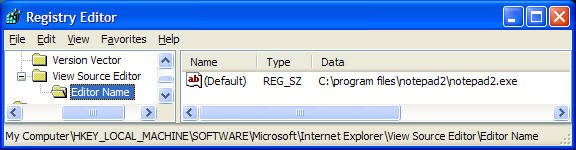
Microsoft Visual Web DeveloperThe no-cost Visual Web Developer offers a debug environment that works great for debugging Javascript. Other script debugging resources are also available. Enhance the View > Source commandIn IE8, no registry hacking is required; choose your view source editor using the Developer Tools "File" menu. Using the registry, you can change the editor used by Internet Explorer's View | Source menu item.
Notepad2 is a popular freeware Notepad replacement which does syntax highlighting. You can set HTML highlighting as the default using Notepad2's View | Syntax Scheme menu item. Troubleshooting FavIconsRead this article to learn more about making site icons appear in the Address Bar, tab, and Favorites. A few words on CookiesInternet Explorer recently changed the number of cookies allowed per domain from 20 to 50. For more information on this change, and on IE cookie handling in general, check out the IEBlog announcement. Detect IE Bitness (32bit / 64 bit)javascript:alert(window.navigator.cpuClass);... shows "x64" in 64bit ie, and "x86" in 32bit IE on x64. Or, you can sniff the token in the user-agent string.
Running pages (including script) from your local computerWant to get rid of this Information bar when debugging HTML pages on your local computer?
See http://msdn2.microsoft.com/en-us/library/ms537628.aspx about adding the Mark of the Web to your page. <!doctype html> BugListSee Internet Explorer Bugs for some known issues with IE7. Web Performance Tips
NewsGet the latest news on the IE Team blog and the Windows Networking blog.
|